
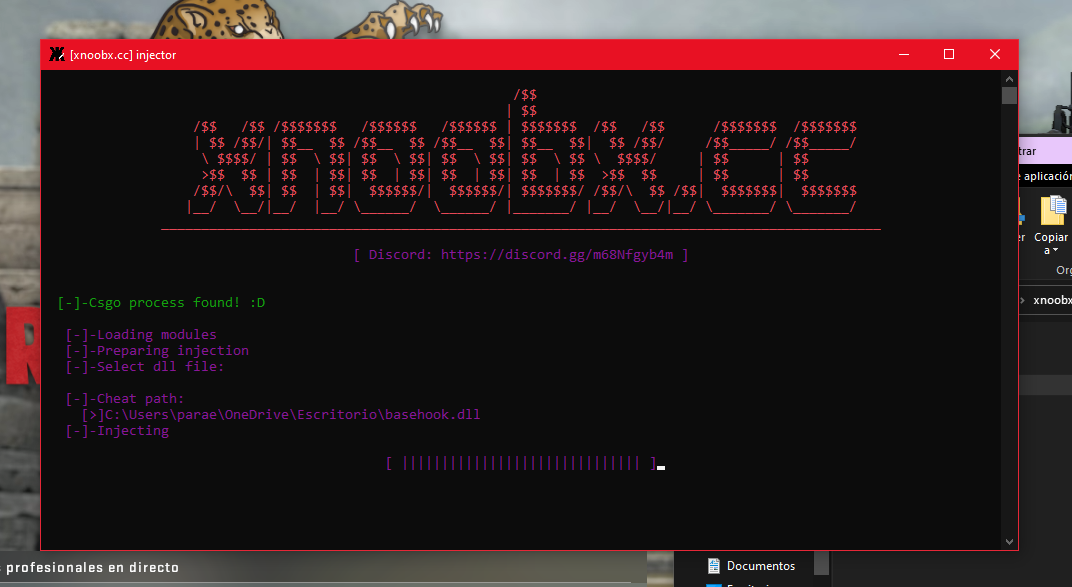
Common problems
- Failed to load BlackBone driver.
- A process has requested access to an object but has not been granted those access rights.
- Injection failed with error code 0xC0000225. Injector failed to resolve one or more dll dependencies. Make sure you have all required dlls and proper CRT libraries. In the case of kernel manual mapping, dependencies should be placed near the target process executable or in the system32 (SysWOW64 for 32-bit processes) folder.
Additional Information
| Classification: | Injector |
| Developer: | DarthTon |
| Current Version: | v2.3.2 |
| Reference: | UnKnoWnCheaTs |
| Observation Status: | Undetected |
Xenos Injector Menu Advanced Options:
Injection Type:
- Native inject — a common approach using LoadLibraryW \ LdrLoadDll in newly created or existing thread
- Manual map — manual copying image data into target process memory without creating section object
- Kernel(New thread) — kernel mode ZwCreateThreadEx into LdrLoadDll. Uses driver
- Kernel(APC) — kernel mode APC into LdrLoadDll. Uses driver
- Kernel(Manual map) — kernel manual mapping. Uses driver
Native Loader Options:
- Unlink module — after injection, unlink module from InLoadOrderModuleList, InMemoryOrderModuleList, InInitializationOrderModuleList, HashLinks and LdrpModuleBaseAddressIndex.
- Erase PE — after injection, erase PE headers
- Use existing thread — LoadLibrary and init routine will be executed in the context of a random non-suspended thread.
Manual Map Options:
- Add loader reference — Insert module record into InMemoryOrderModuleList/LdrpModuleBaseAddressIndex and HashLinks. Used to make module capabilities (for example GetModuleHandle, GetProcAddress) work with a physically planned picture.
- Physically settle imports — Image import and postponed import dlls will be likewise physically planned as opposed to being stacked utilizing LdrLoadDll.
- Wipe headers — Erase module header data after infusion. Additionally influences physically planned imports.
- Disregard TLS — Don’t deal with picture static TLS information and call TLS callbacks.
- No special case support — Don’t make custom exemption overseers that empower out-of-picture exemption support under DEP.
- Hide memory — Make picture memory apparent as PAGE_NO_ACESS to memory inquiry capabilities
How To Fix Failed to load BlackBone Driver:
- A process has requested access to an object but has not been granted those access rights.
- If you are using an account with admin rights — run the program as Administrator. If you are using a restricted user account — enable UAC and then run as Administrator.
- Injection failed with error code 0xC0000225. The injector failed to resolve one or more dll dependencies. Make sure you have all required dlls and proper CRT libraries. In case of kernel manual mapping, dependencies should be placed near target process executable or in system32 (SysWOW64 for 32bit processes) folder.
Запуск DirectPlay в устаревших компонентах при возникновении ошибки 0xc0000022
« DirectPlay » — это устаревший ныне API, ранее являющийся важным составным элементом «Microsoft DirectX API». По сути, «DirectPlay» – это библиотека сетевых коммуникаций, использующаяся в первую очередь для создания игр. Но бывают и случаи, когда она используется для других задач в приложениях общего назначения.
Если вы столкнулись с ошибкой 0xc0000022 при попытке открыть старую игру или приложение, то это произошло потому, что оно пытается использовать dll-файл , который устарел вместе с «DirectPlay».
Компоненты DirectPlay считаются устаревшими в Windows 8.1 и Windows 10, и DirectPlay в данных ОС отключен по умолчанию. Но его всё равно можно включить в настройках вашей Windows, и тем самым избавиться от ошибки.
Осуществите следующее для исправления ситуации:
- Нажмите на Win+R, и в появившемся окне наберите appwiz.cpl и нажмите на Энтер;
- Откроется окно « Программы и компоненты ». Слева найдите надпись « Включение и отключение компонентов Виндовс » и кликните на неё;

В открывшемся окне компонентов найдите « Компоненты прежних версий » (Legacy Components);
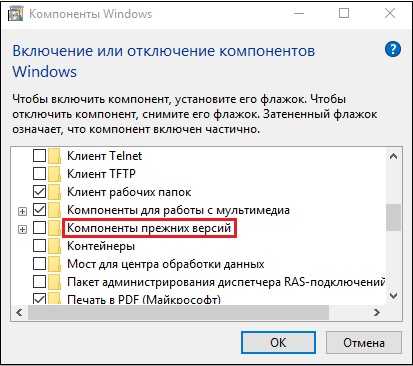
Найдите «Компоненты прежних версий» Поставьте слева от данной опции галочку, а затем нажмите на плюсик слева, и поставьте галочку рядом с открывшейся опцией « DirectPlay »;

Нажмите внизу на « Ок »;
Подождите какое-то время, пока Виндовс произведёт соответствующие изменения в своей структуре;
После этого перезагрузите ваш ПК, и попробуйте включить проблемную ранее программу.
Features of Xenos Injector
- Modding Video Games: One of the most common applications of the Xenos Injector is in the gaming community. Gamers and developers alike use it to modify video games, introducing custom content, altering graphics, or even cheating in online games. While some modifications are harmless and aim to enhance the gaming experience, others may create an unfair advantage, leading to concerns about fair play.
- Debugging and Reverse Engineering: Software developers and security researchers often use injectors like Xenos to aid in debugging and reverse engineering processes. Injecting specific code into a running program allows them to analyze its behavior, identify vulnerabilities, and ultimately improve the software’s quality and security.
- Customizing Software: Xenos Injector is also employed for customizing various software applications. Users can inject DLLs that tweak the user interface, automate certain tasks, or provide additional features that were not originally part of the software.
- Malicious Exploits: Unfortunately, the same capabilities that make the Xenos Injector a valuable tool can also be exploited for malicious purposes. Malware creators can use injectors to inject harmful code into legitimate processes, enabling them to gain unauthorized access to systems, steal sensitive information, or launch attacks.
Download
How to Use Xenos Injector Safely

Xenos injector is a tool that allows gamers to use cheats in their favorite games. The program works by injecting coded dll files into the game, making it undetectable by anti-cheat engines. The program is free to download and compatible with all Windows operating systems. It also supports a range of different gaming platforms. Xenos injector is one of the most popular tools for playing video games, and it can help you improve your performance by providing better FPS rates and smoother gameplay.
It can be difficult to hack a game without the right tools, but with Xenos injector, you can do it easily. This program helps you to cheat in games such as CS: GO and GTA 5, among others. Its main function is to bypass the anti-cheat programs in these games and enable you to do everything that you want in the game. This is why many people consider it the best dll injector for games.
Cheating in video games is a common practice. While some players may consider it a despicable act, others do it for various reasons. For example, they might be stuck in a certain level and want to cheat to get ahead, or they may simply want to play God or be a total jerk. However, cheating can be dangerous to your computer, so it’s important to understand how to use a dll injector safely.
In computer programming, DLL injection is a technique used for running code within the address space of another process by forcing it to load a dynamic-link library. Normally, a process loads a DLL only when it needs to access its functions. But, with DLL injection, the injected DLL is executed before the actual DLL is loaded, which can bypass any security measures in place. Moreover, the injected DLL can have any number of functions that can manipulate the system in ways the original DLL cannot.
Xenos Injector is a DLL injection tool that lets you hack games and much more. The software can run on all versions of Windows and is fully portable. It can even be ported to Android, iOS, and Linux. In addition, it is completely undetectable by antivirus software.
Injecting a DLL into a process is simple and can be done with just a few lines of code. The key is to make sure that the injected DLL occupies the same addresses as the original DLL. If this is not the case, the DLL will be freed when LoadLibrary() is called. To prevent this, the code above allocates memory for the same address range that the DLL occupied previously. This ensures that the DLL will not be freed when the next LoadLibrary() is called. This will keep the injector undetected in most cases.
Conclusion
The Xenos Injector is a powerful tool that showcases the dual nature of technology – it can be used for both positive and negative purposes. Its ability to inject code into running processes opens doors to innovation and convenience but also raises concerns about fairness, security, and ethics. As the tech landscape continues to evolve, it’s crucial for users, developers, and policymakers to collaborate in ensuring that tools like the Xenos Injector are harnessed responsibly, fostering a safer and more equitable digital environment.
Table of Contents
Additional notes
Injector has 2 versions — x86 and x64. Apart from obvious features, the x86 version supports the injection of x64 images into x64 processes; the x64 injector supports the injection of x86 and x64 images into WOW64 processes. However, this is only valid for native images. If you want to inject a pure managed DLL — use the same injector version as your target process.
The injection of x64 images into the WOW64 process is totally unpredictable. If you want to do this I would recommend using manual mapping with the manual imports option, because the native loader is more buggy than my implementation in this case (especially in Windows 7).
Обзор лучших инжекторов для января 2022 года
В январе 2022 года представлено несколько новых инжекторов, которые привлекают внимание пользователей своими функциональными возможностями и удобством использования. В этом обзоре мы рассмотрим некоторые из самых популярных инжекторов на данный момент
-
Extreme Injector
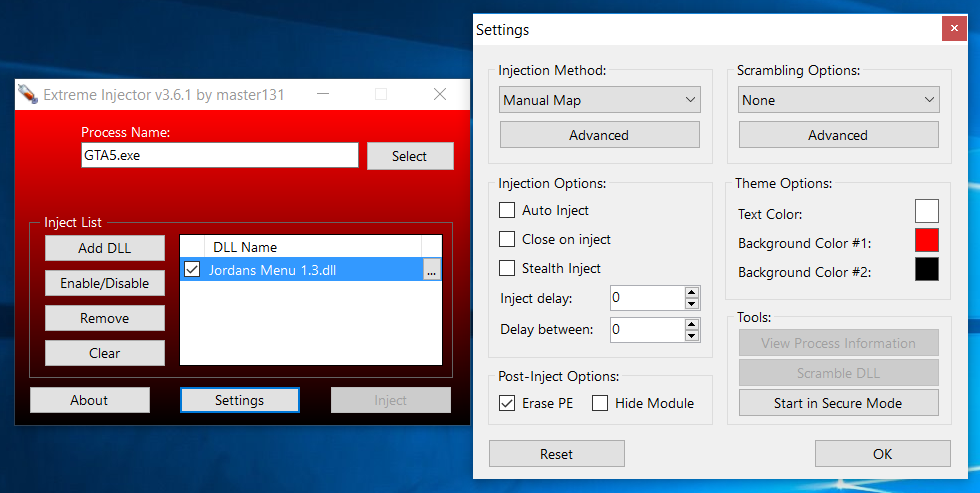
Extreme Injector — один из самых известных и надежных инжекторов с открытым исходным кодом. Он обладает большим количеством функций, таких как инжекция в системные процессы, скрытие инъекции от антивирусных программ, автоматическая инжекция при запуске программы и многое другое. Пользователи отмечают его простой и интуитивно понятный интерфейс, а также стабильную работу на различных операционных системах.
-
-
Xenos Injector
Xenos Injector — еще один популярный инжектор с открытым исходным кодом. Он обладает широким набором функций, таких как инжекция в процессы x86 и x64, работа с различными типами DLL-библиотек, изменение приоритета процесса и многое другое. Xenos Injector также обеспечивает стабильную работу и имеет удобный интерфейс.
-
GH Injector
GH Injector — инжектор, который отличается своей простотой и функциональностью. Он обеспечивает быструю и безопасную инжекцию кода в процессы, поддерживает работу с различными типами DLL-библиотек и предоставляет возможность запуска программы сразу после инжекции. Пользователи отмечают его надежность и удобный интерфейс.

![✅ grand theft auto 5 (gta v): инжектор xenos [x32,x64] - youngguns.su](https://vvk-yar.ru/wp-content/uploads/4/8/8/488b76d51281c91fa4532618649a70da.jpeg)


Это лишь небольшая часть из множества доступных инжекторов. Выбор инжектора зависит от ваших потребностей и предпочтений, поэтому рекомендуется ознакомиться с отзывами пользователей и провести собственное исследование, чтобы найти наиболее подходящий вариант для ваших задач.
0xC0000022 about xenos HOT 1 CLOSED
A process has requested access to an object but has not been granted those access rights. Run as admin
- driver not detected with kdmapper
- Xenos compilation error HOT 2
- Inject Success,but Hook faild
- I found a strange problem!
- Failed to inject image — Error code 0xC00000EF HOT 1
- add a darck mode pls
- Error in injector attach to pid. Bug related with «Can not attach to the process.n»
- Xenos won’t run. HOT 1
- Any specific reason why Xenos enables exceptions before execution? HOT 1
- Cant compile HOT 4
- cant Build with VS2019 HOT 1
- please select «modmenu.dll» entry point HOT 1
- Error 0xc0000022 HOT 1
- So many errors while compiling HOT 2
- Having trouble building with VS2019 HOT 2
- Failed to load blackbone driver HOT 1
- Help With Compiling HOT 1
- game crashing HOT 2
- I Dont Know If This Is A Base Error Or A Xenos Error
- Compiled Succeffully but cant use kernel mode (Unsolved) HOT 2
Подробная инструкция: настройка xenos injector
Xenos Injector — это инструмент, который позволяет внедрять dll-файлы в процессы других программ. Он широко используется в области видеоигр для запуска читов и модификаций. В этой инструкции мы рассмотрим, как правильно настроить и использовать Xenos Injector.
- Скачайте Xenos Injector
Первым шагом является скачивание Xenos Injector с официального сайта разработчика или с надежного источника
Обратите внимание, что нерепутабельные источники могут содержать вредоносное ПО. Будьте осторожны, и всегда проверяйте файлы перед их использованием
Выберите dll-файл
Прежде чем переходить к настройке Xenos Injector, вам необходимо выбрать dll-файл, который вы собираетесь внедрять в целевую программу. Убедитесь, что вы получили dll-файл из надежного источника, и он соответствует вашим потребностям.
Откройте Xenos Injector
После скачивания Xenos Injector запустите его. Вам может потребоваться администраторские права для успешного запуска программы. Убедитесь, что вы запускаете последнюю версию Xenos Injector, чтобы иметь доступ ко всем последним функциям и исправлениям ошибок.
Прочитайте и принимайте пользовательское соглашение
Вам будет предложено прочитать и принять пользовательское соглашение Xenos Injector. Внимательно прочитайте все условия использования и, если вы согласны с ними, отметьте соответствующую галочку или следуйте другим инструкциям, предоставленным в программе.
Выберите целевой процесс
На этом этапе вам нужно выбрать процесс, в который вы хотите внедрить dll-файл. Нажмите на кнопку «Add» или «Выбрать процесс» и выберите нужный процесс из списка. Если процесс, в который вы хотите внедрить dll, не отображается в списке, убедитесь, что он уже запущен.
Выберите dll-файл для внедрения
Нажмите на кнопку «Add» или «Выбрать файл» и выберите dll-файл, который вы хотите внедрить в выбранный процесс. Убедитесь, что выбранный файл соответствует вашим потребностям и не является вредоносным.
Настройте внедрение
После выбора dll-файла вы можете настроить параметры внедрения. Xenos Injector предоставляет различные опции, такие как автоматическое внедрение при запуске, автоматическое внедрение при выборе процесса и другие. Выберите опции, которые наиболее соответствуют вашим потребностям.
Внедрите dll-файл
После завершения настройки нажмите на кнопку «Inject» или «Внедрить», чтобы начать процесс внедрения. Если все настройки выполнены правильно, Xenos Injector успешно внедрит выбранный dll-файл в выбранный процесс.
Проверьте результат
После завершения внедрения проверьте результат. Если все прошло успешно, ваш dll-файл должен быть активирован и работать в выбранном процессе.
Обратите внимание, что использование Xenos Injector для незаконных целей, таких как взлом игр или вредоносные действия, является противозаконным и наказуемым. Пожалуйста, используйте это программное обеспечение только для законных и этических целей
Основные критерии выбора
При выборе X64 инжектора следует обратить внимание на несколько важных критериев. Ниже приведены основные критерии, которые следует учитывать при выборе инжектора:. 1
Безопасность
1. Безопасность
2. Совместимость
Убедитесь, что выбранный вами инжектор совместим с вашей операционной системой и игрой. Некоторые инжекторы могут быть оптимизированы только для определенных версий ОС или игр, поэтому перед выбором необходимо проверить их совместимость.




3. Простота использования
Инжектор должен быть легким в использовании и иметь простой и понятный интерфейс. Если вы не знакомы с инжекторами ранее, выбирайте инструмент с интуитивно понятным пользовательским интерфейсом, который не потребует дополнительных знаний или навыков для его использования.
4. Функциональность
Выбирайте инжектор, который предлагает все необходимые функции для вашего использования. Некоторые инжекторы могут иметь дополнительные функции, такие как сохранение настроек, автоматическое обновление и т. д. Определите свои требования и найдите инжектор, который полностью удовлетворит ваши потребности.
5. Поддержка и обновления
Проверьте, есть ли у выбранного вами инжектора активная поддержка и обновления. Такие инжекторы обычно имеют меньше ошибок и обновляются с учетом последних требований и изменений в ОС и играх. Если инжектор не имеет активной поддержки, он может стать устаревшим и несовместимым с будущими версиями игр или ОС.
Учитывайте вышеперечисленные критерии при выборе X64 инжектора, чтобы найти надежный и удобный инструмент, который впишется в ваши потребности и обеспечит безопасность вашей системы.
Xenos injector v2.3.2
You’ve come to the correct site, Gamerfun
if you’re seeking the best injector for online gaming. One of the most popular
injectors used by players to add content to their favorite games is Xenos
injector v2.3.2. For Downloads and Instructions, read the remaining portions of
the article.
Games like CSGO, GTA 5, PUBG, and many
other well-known online games that load DLL files into the Injector reasonably
readily benefit greatly from the use of injectors.
Download GodLoader and Get the Best Cheating Experience with Our Easy-to-Use Free Cheats Loader and Top-Quality Hacks!
The majority of games, including the most
well-known ones, are compatible with this injector. The most powerful free
injector outperforms them all. It is furthermore current. The x86 and x64 bit
architectures are also supported.
Xenos Injector v2.3.2 Redesigned GUI Features:
- Supports processes and modules for both x86 and x64.
- A redesigned GUI.
- Kernel-mode injection capability (driver required.)
- Kernel driver manual map (driver required.)
- Pure managed image injection without proxy dll.
- Cross-session and cross-desktop injection in Windows 7.
- Process injection into native ones (those having onlyntdll loaded.)
- After injection, calling a custom startup routine.
- Module unlinking upon injection.
- Thread hijacking for injection.
- WoW64 process injection of x64 images.
- Manual image mapping.
- Profiles for injection.
Features Of Manual Maps For Xenos Injector
- Import, import delays, and constrained import.
- Static TLS and callbacks for TLS.
- Xenos injector v2.3.2 include Cookie for security.
- SxS and image manifests.
- Make the module accessible to GetProcAddress, GetModuleHandle, etc.
- Support for private memory exceptions under DEP.
- C++/CLI images are supported (in this case, use ‘Add loader reference’).
Процесс внедрения и использования xenos injector
Xenos injector – это мощный инструмент, который позволяет внедрять различные дополнения и модификации в игры. В данном руководстве будет описан процесс настройки и использования xenos injector.
Шаг 1: Загрузка xenos injector
Первым шагом необходимо загрузить xenos injector на свой компьютер. Вы можете найти последнюю версию программы на официальном сайте разработчика или на специализированных форумах и ресурсах.
Шаг 2: Подготовка к внедрению
Прежде чем начать внедрять дополнения, убедитесь, что у вас есть файлы игры, в которую вы хотите внедрить модификации. Также убедитесь, что ваша операционная система совместима с xenos injector.
Шаг 3: Запуск xenos injector
После загрузки xenos injector запустите программу. В большинстве случаев этого достаточно для начала работы с инжектором.
Шаг 4: Выбор процесса
После запуска xenos injector выберите процесс, к которому вы хотите применить дополнения. Обычно это процесс самой игры, которая должна быть уже запущена.
Шаг 5: Выбор дополнений
После выбора процесса откроется окно с доступными дополнениями и модификациями. Вам необходимо выбрать нужные вам дополнения и нажать кнопку «Инжект».
Шаг 6: Проверка результатов
После успешного внедрения дополнений вы можете проверить результаты, запустив игру и убедившись, что дополнения работают корректно.
Шаг 7: Отключение дополнений
Если вам нужно отключить добавленные дополнения, вы можете просто закрыть xenos injector или выбрать опцию «Выталкивание DLL».
Шаг 8: Обновление и настройка
Некоторые версии xenos injector требуют регулярного обновления. Вам следует проверять наличие новых версий программы и устанавливать их, чтобы получить все последние функции и исправления ошибок.


![Grand theft auto 5 (gta v): инжектор xenos [x32,x64]](https://vvk-yar.ru/wp-content/uploads/0/1/e/01e3c386e8250971e80175c3f478ca0f.jpeg)


Теперь у вас есть базовое представление о том, как использовать xenos injector для внедрения дополнений и модификаций в игры. Будьте внимательны и использование инжектора только в соответствии с условиями использования игр, чтобы избежать неприятных последствий.
How to use Xenos injector v2.3.2
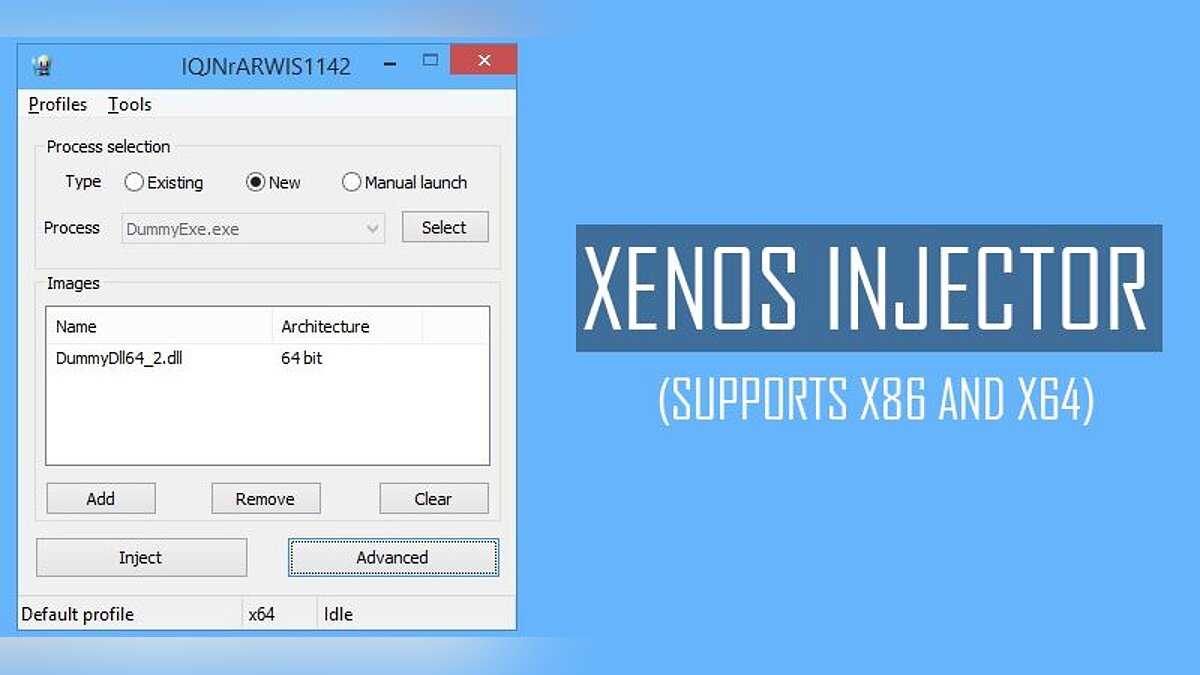
Xenos Injector Process Selection Injection:
- Select the existing process from the list in the menu
- A new process will be launched before injection
- Manual launch — after pressing ‘Inject’ button, injector will wait for the target process to startup
Xenos injector Images Injection:
- List of images you want inject
- Add a new image to the list. (drag and drop is also supported)
- Remove selected image
- Clear image list
Differences Between Kernel Manual Map And User-mode
There are just a few minor differences
between user-mode and kernel manual map features
- No support for C++ exception handling for x64 images (only SEH.)
- TLS is not static.
- Incompatibility with native loaders.
- Path resolution for limited dependencies. Only system directory, target
executable directory, SxS, and API set schema.
Xenos Injector 2023 Added Information Operating Systems: Win7-Win10 X64
X86 and x64 are the two versions of Xenos
injector v2.3.2. In addition to the obvious features, the x86 version allows
the injection of x64 pictures into x64 processes, while the x64 injector allows
the injection of both x86 and x64 images into WOW64 processes. This is only
true for native photos, though. Use the exact same injector version as your
target process if you wish to inject a pure managed dll.
WOW64 process injection of x64 pictures is
completely unexpected. If you wish to accomplish this, I advise using the
manual mapping and manual imports options because, in this situation, the
native loader is more buggy than my solution (especially in windows 7).
- A 32-bit image cannot be injected into an x64 process.
- Manually map 64 bit photos with the x86 version, and 32 bit images with
the x86 version. - Only native injection is supported for pure managed images; you cannot
manually map them. - X86 OS versions may not run correctly.
- Kernel injection needs Driver Test signing mode and is only supported on
x64 OSes.
Changelog in Xenos Injector Latest Version:
Xenos injector v2.3.0
- Support for the Win10 Creators Update.
- Unified injection mapping (injector -> target): x86->x86,
x64->x64, x86->x64, x64->x86. - Bug fixes and stability upgrades.
Xenos Injector Menu Advanced Options:
Injection Type:
- Native inject — a common approach using LoadLibraryW \ LdrLoadDll in newly created or existing thread
- Manual map — manual copying image data into target process memory without creating section object
- Kernel(New thread) — kernel mode ZwCreateThreadEx into LdrLoadDll. Uses driver
- Kernel(APC) — kernel mode APC into LdrLoadDll. Uses driver
- Kernel(Manual map) — kernel manual mapping. Uses driver
Native Loader Options:
- Unlink module — after injection, unlink module from InLoadOrderModuleList, InMemoryOrderModuleList, InInitializationOrderModuleList, HashLinks and LdrpModuleBaseAddressIndex.
- Erase PE — after injection, erase PE headers
- Use existing thread — LoadLibrary and init routine will be executed in the context of a random non-suspended thread.
Manual Map Options:
- Add loader reference — Insert module record into InMemoryOrderModuleList/LdrpModuleBaseAddressIndex and HashLinks. Used to make module capabilities (for example GetModuleHandle, GetProcAddress) work with a physically planned picture.
- Physically settle imports — Image import and postponed import dlls will be likewise physically planned as opposed to being stacked utilizing LdrLoadDll.
- Wipe headers — Erase module header data after infusion. Additionally influences physically planned imports.
- Disregard TLS — Don’t deal with picture static TLS information and call TLS callbacks.
- No special case support — Don’t make custom exemption overseers that empower out-of-picture exemption support under DEP.
- Hide memory — Make picture memory apparent as PAGE_NO_ACESS to memory inquiry capabilities
How To Fix Failed to load BlackBone Driver:
- A process has requested access to an object but has not been granted those access rights.
- If you are using an account with admin rights — run the program as Administrator. If you are using a restricted user account — enable UAC and then run as Administrator.
- Injection failed with error code 0xC0000225. The injector failed to resolve one or more dll dependencies. Make sure you have all required dlls and proper CRT libraries. In case of kernel manual mapping, dependencies should be placed near target process executable or in system32 (SysWOW64 for 32bit processes) folder.
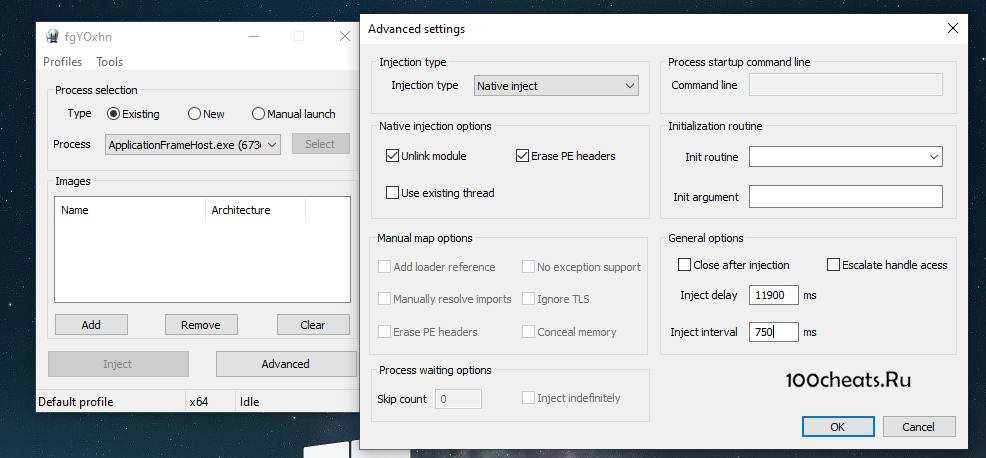
Advanced options
Injection type
- Native inject — a common approach using LoadLibraryW \ LdrLoadDll in a newly created or existing thread.
- Manual map — manually copying image data into target process memory without creating a section object.
- Kernel(New thread) — kernel mode ZwCreateThreadEx into LdrLoadDll. Uses driver.
- Kernel(APC) — kernel mode APC into LdrLoadDll. Uses driver.
- Kernel(Manual map) — kernel manual mapping. Uses driver.
Native Loader options:
- Unlink module — after injection, unlink the module from InLoadOrderModuleList, InMemoryOrderModuleList, InInitializationOrderModuleList, HashLinks, and LdrpModuleBaseAddressIndex.
- Erase PE — after injection, erase PE headers.
- Use existing thread — LoadLibrary and init routine will be executed in the context of the random non-suspended thread.
Manual map options:
- Add loader reference — Insert module record into InMemoryOrderModuleList/LdrpModuleBaseAddressIndex and HashLinks. Used to make module functions (e.g., GetModuleHandle, GetProcAddress) work with the manually mapped images.
- Manually resolve imports — Image import and delayed import dlls will be also manually mapped instead of being loaded using LdrLoadDll.
- Wipe headers — Erase module header information after injection. Also affects manually mapped imports.
- Ignore TLS — Don’t process image static TLS data and call TLS callbacks.
- No exception support — Don’t create custom exception handlers that enable out-of-image exception support under DEP.
- Conceal memory — Make image memory visible as PAGE_NO_ACESS to memory query functions
Command Line
Process command line arguments
Init routine:
- If you are injecting a native (not pure IL) image, this is the name of the exported function that will be called after the injection is done. This export is called a void (__stdcall)(wchar_t) function.
- If you are injecting a pure managed image, this is the name of the public method that will be executed using ICLRRuntimeHost::ExecuteInDefaultAppDomain.
Init argument:
- A string that is passed into the init routine
Close after injection:
- Close injector after successful injection
Inject delay:
- Delay before injection start
Inject interval:
- The delay between each image
Menu options:
Profiles⇒Load — load injection profileProfiles⇒Save — save current settings into the profile
Tools⇒Eject modules — open module ejection dialogTools⇒Protect self — make injector process protected (driver required)
Command line options:–load — start injector and load target profile specified by–run — immediately execute profile specified by without GUI
Kernel injection methods require the system to run in Test mode.